Automate Client Onboarding: From First Contact to First Engagement Without the Admin
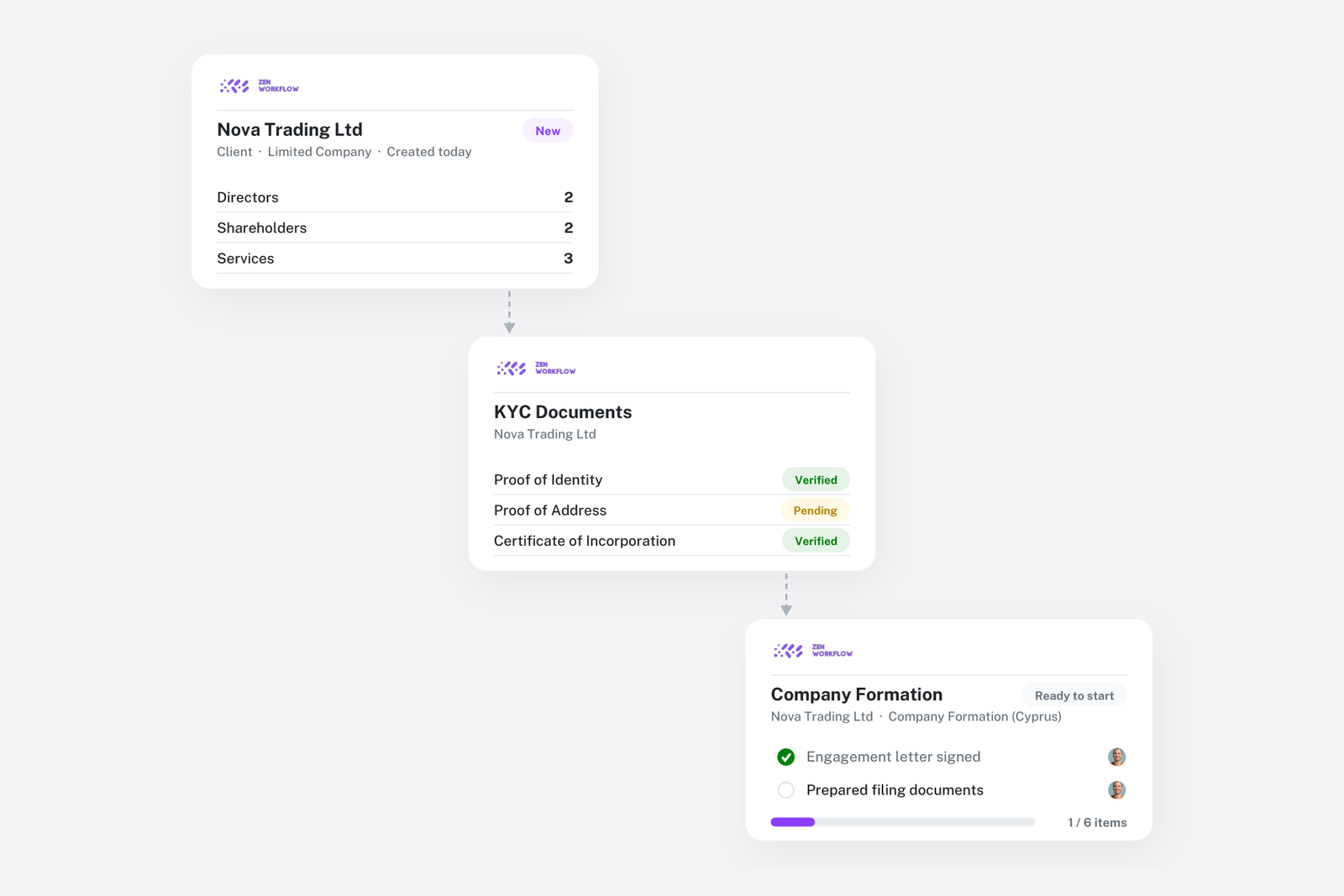
Onboarding is the first time a new client sees how your firm actually works. If the first fortnight is three forms asking for the same company details, a chain of emails about a missing passport scan and a job that quietly waits until someone remembers to start it, that is the impression that sticks. It is also where firms carry the most compliance risk, because the work often starts before the file is complete.
The fix is not a bigger checklist. It is doing each step once, in the right order, on one record. This article walks through how onboarding runs in ZenWorkflow, from the moment a client says yes to the moment the first engagement is underway.
Why onboarding breaks in most firms
The same company data is typed into the engagement letter, the KYC spreadsheet and the practice system by three different people. Proof of identity and address arrive as email attachments, get forwarded to whoever is handling the file, and nobody records the expiry date. Screening happens when someone thinks of it. And the first job is created by hand, from memory, so it starts differently each time depending on who sets it up.
None of these steps is hard. The problem is that they live in different places, so the state of a new client is a question you have to ask rather than something you can see.
Step 1: Create the client once
Everything starts with the client record. Add the entity with its directors, shareholders, contacts and the services you will provide. Custom fields hold whatever else your firm tracks, such as the introducer, the responsible partner or the regulator reference. If you are bringing a batch of clients across from another system, import individuals and business entities from Excel with their people and fields in one pass.
From this point on, every other part of onboarding reads from and writes to this record. There is nothing to copy anywhere.
Step 2: Clear the KYC file on the same record
On the Practice + AML plan, the compliance work sits on the client's KYC tab rather than in a separate system:
- Collect proof of identity and proof of address against each person, with expiry dates recorded so documents do not silently lapse.
- Screen directors, shareholders and beneficial owners for PEP and sanctions matches, and record the outcome against each person.
- Complete the risk assessment questionnaire your firm has defined. The rating is scored from the answers, and a partner can override it with a documented reason.
- Route the assessment for approval where your procedures require it.
Because this is the same record the engagement team uses, "is this client cleared?" is visible on the file, not a question for the compliance officer. See the AML/KYC compliance page for the full picture.
Step 3: Collect documents without the email chain
Instead of attaching files to email, share a document request or a profile with the client by secure magic link. Files land on the client record, where the whole team can find them. Firms that keep their documents in Google Drive can connect a client folder so the files stay where they already live but are reachable from the client page.
Step 4: Launch the first engagement from a template
When the file is cleared, clone the template for the service the client signed up for. The workflow arrives with its items, owners, fee and due date already set, so the first job starts structured rather than from a blank page. If the service is recurring, assign it to the client so the next cycle is created with everyone else's.
Templates are what make onboarding consistent regardless of who handles it. Read more on workflow templates and automation.
Step 5: Treat onboarding itself as a workflow
The most reliable way to stop new clients from stalling is to make onboarding a workflow of its own, created from a template with the steps above as items. It then shows in the workflow list with an owner, a status and a due date like any other job, and an onboarding that has stalled is simply an overdue workflow rather than a surprise.
What a good onboarding template contains
A template most firms converge on looks like this:
- Engagement letter signed and filed
- Client record complete: people, services, custom fields
- Identity and address documents collected, expiry recorded
- Screening complete for every relevant person
- Risk assessment completed and approved
- Billing set up: fee basis, rates and invoicing contact
- First engagement created from its service template
- Welcome call booked and client given access to what they need
Each item has an owner, so the compliance steps sit with the compliance team and the billing steps with the person who raises invoices, while the partner sees the whole thing move.
Frequently asked
Can clients upload documents without an account? Yes. A magic link opens a secure page where they upload what you asked for, and the files arrive on their record. There is no portal to register for.
Does this replace our engagement letter tool? No. The engagement letter stays where you produce it today. ZenWorkflow is the record of the client, the compliance file and the work.
What if the client is a group of entities? Create each entity as its own client with its directors, shareholders and related parties. Ownership between entities is recorded on the records, so the group is visible without a separate chart.
Where to start
If you are evaluating this for your firm, book a demo and bring a real onboarding you have in progress. We will set it up end to end on the call. Or start a free trial and build your onboarding template first; it is the one that pays back fastest.