Move Your Practice Off Spreadsheets
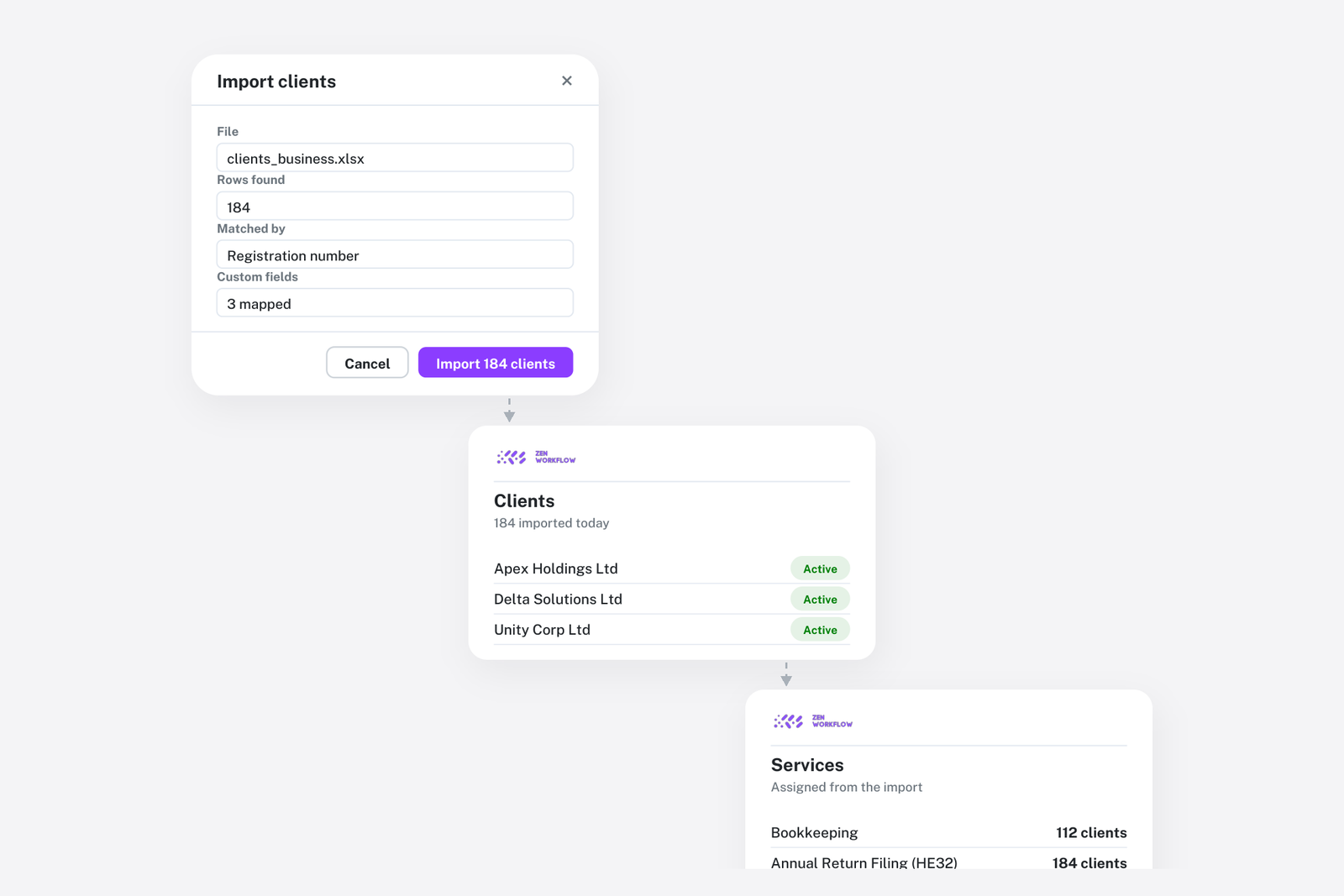
Every firm starts on spreadsheets and most stay longer than they should. The client list is a sheet. The deadline tracker is a sheet. Work in progress is a sheet someone updates on Fridays. The KYC register is a sheet with a column for the next review date. Each one is reasonable on its own. Together they are four descriptions of the same practice that disagree with each other, and reconciling them is a part-time job.
Spreadsheets fail at a predictable point: when more than one person updates them, when the same client appears in all of them, and when anything needs to be done on a schedule. Moving off them is less about software than about putting each fact in one place.
What replaces each sheet
- Client list: the client record: people, services, custom fields, documents
- Deadline tracker: due dates on workflows, with reminders and a coverage view
- WIP and time sheet: weekly timesheets against jobs, with unbilled work per client
- Fee schedule: fees and budgets on templates and services
- KYC register: the client's KYC tab: assessments, screening, documents with expiry
- Leave tracker: leave requests, balances and a team calendar
- Management pivot tables: pivot reports over time, revenue and payments
The point is not that each becomes a module. It is that they all describe the same client, so the client is entered once.
Step 1: Import what you have
Export your client list to Excel and import it. Individuals and business entities come across with their contacts, directors, shareholders and any custom columns mapped to custom fields. Review the result before it goes live. A firm with a few hundred clients does this in an afternoon, and the client list is retired that day.
Step 2: Replace the deadline tracker with services and templates
For each recurring service, build a template and assign the service to the clients who receive it. Then bulk-create the current cycle. The deadline tracker's rows become workflows with owners, due dates and status, and the tracker is retired because the list is now generated rather than typed. Never miss a filing deadline describes how the list is worked.
Step 3: Log time against jobs
Move the team onto weekly timesheets against workflows. The WIP sheet is replaced by the unbilled view per client, which is calculated from the time and fees on the jobs rather than maintained. This is usually the step with the most visible payoff, because unbilled work that was invisible in the sheet becomes a number.
Step 4: Move the KYC register
On the Practice + AML plan, enter each client's current risk rating and the dates and expiry of their documents. The register's next-review column is replaced by review dates derived from the rating, with reminders. Start with the high-risk clients; they are the ones a regulator will ask about.
Step 5: Retire the pivot tables
Once time, fees and invoices are on the same jobs, the monthly pivot tables are replaced by reports that are current on any day. Seeing the health of your practice covers what they show.
How long it takes
Firms that do this in order, one sheet at a time, are typically running their core services in the new system within a few weeks. The import is a day. The first templates are a week, because they involve the team. Time tracking takes a month to become habit. The KYC register depends on how many clients are high risk. The common mistake is to try to move everything at once; the common success is to retire one spreadsheet, see that nothing broke, and move on to the next.
Why not a generic project tool?
Firms sometimes move from spreadsheets to a general task tool. It solves the deadline tracker and nothing else, because it has no idea what a client, a fee, a timesheet or a KYC document is. The comparison with ClickUp, Asana and monday.com goes through this in detail.
Frequently asked
Can I import from Excel? Yes. Individuals and business entities import with contacts, directors, shareholders and custom fields, and you review before going live.
Do I have to move everything at once? No. Most firms retire one spreadsheet at a time, starting with the client list.
What about documents in Google Drive? Connect a Drive folder per client. The files stay where they are and are reachable from the client record.
Will the team need training? The weekly timesheet and the workflow list are the two screens most people use. Firms typically run a short session on each.
Where to start
Export your client list and import it. That one step retires the first spreadsheet and gives every other step a place to attach to. Book a demo and bring the spreadsheets; we will show you where each one goes. Or start a free trial.