Measure Profitability by Client and Service
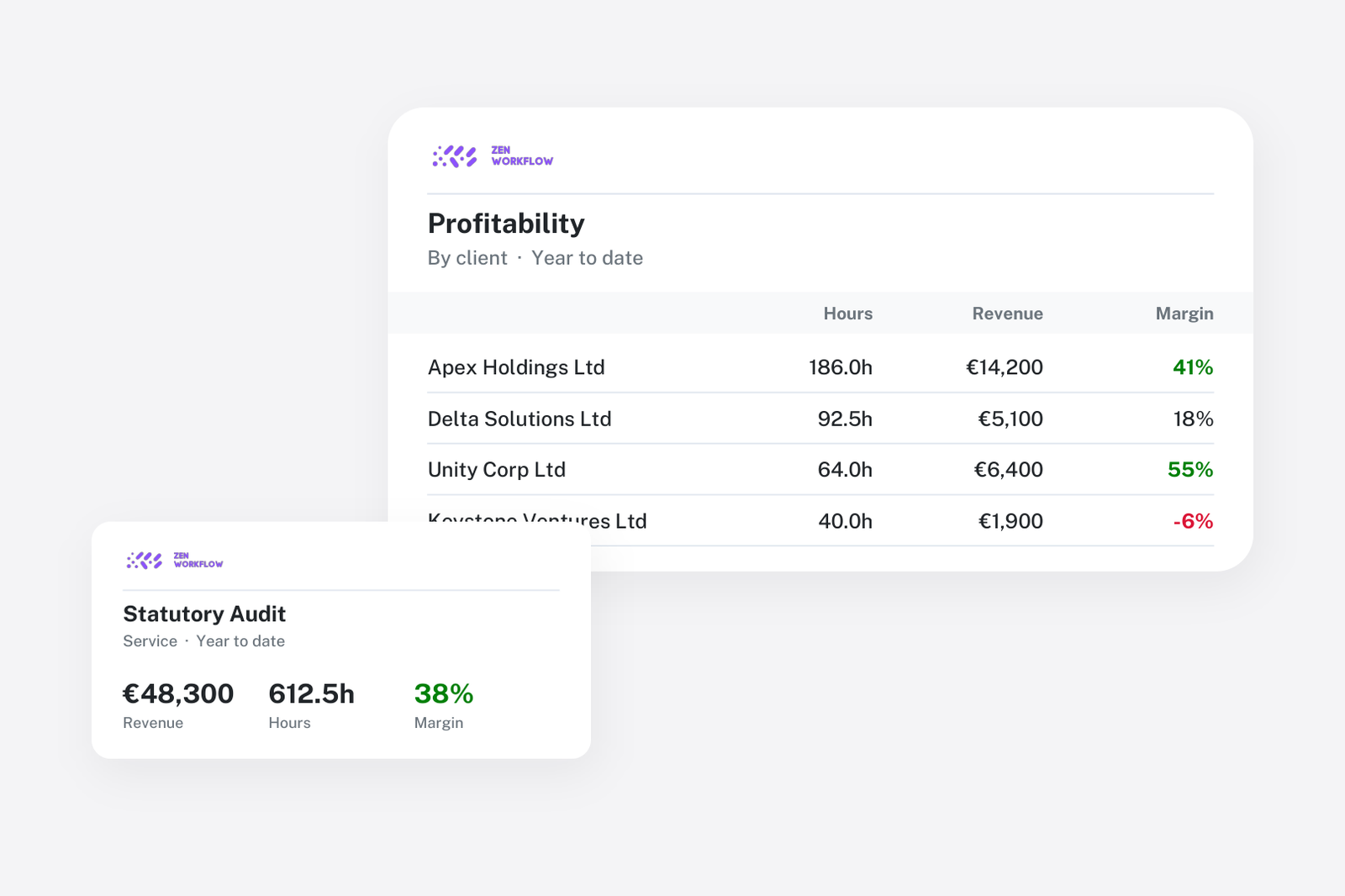
Every firm knows its revenue by client. Far fewer know their profit by client, and almost none know it by service. The reason is not a lack of interest. It is that the inputs live in different places: hours in a timesheet system, rates in a spreadsheet, fees in the engagement letters and invoices in the accounts package. Joining them is a project, so it happens once a year, if at all, and the pricing decisions it should inform are made on instinct.
When hours, rates, fees and invoices sit on the same jobs, profitability stops being a project and becomes a report.
The inputs, and where they live
- Billing rates per team member. Each person has a rate, so an hour logged has a value the moment it is recorded.
- Budgets per job. Each workflow carries budgeted hours and a fee, inherited from its template and adjusted where needed.
- Hours against jobs. Time is logged on the weekly timesheet against the workflow, so it is already attributed to a client and a service.
- Invoices built from the work. Fees and billable hours are invoiced from the job, so revenue is attributed to the same client and service as the cost.
Nothing here is extra work. It is the same data the team already produces to get paid, kept in one place.
Budget against actual, while the job is open
Each workflow shows budgeted against actual hours and fees as the work progresses. This is the fastest profitability signal there is: a fixed-fee job at 110% of budgeted hours is unprofitable today, not at year end. Partners who look at this weekly catch scope creep when a conversation with the client is still possible.
Pivot reports over time, revenue and payments
The reports are pivots rather than fixed layouts. You choose what to group by and, optionally, what to split each group by, and the measures follow:
- Time: hours, billable hours, utilisation and amount at billing rates, grouped by client, service, workflow, team member, period or billing status.
- Revenue: net, tax and total of approved invoices in the period, grouped by client, service, tax rate or currency.
- Payments: what has actually been received, by client and period.
Every group shows its share of the total and a chart, and any report exports to a spreadsheet. The questions firms ask most are answered by two of these side by side: hours at rate by client against revenue by client gives you recovery per client; the same by service tells you which services are priced correctly.
Four questions to ask the reports
- Which clients consume the most hours relative to what we bill them? Group time by client, compare with revenue by client. The clients at the bottom are either under-priced or over-served.
- Which services are consistently over budget? Group time by service with billing status. A service that is always over its template budget needs a new fee or a new template.
- Who is utilised and who is not? Group time by team member with billable and non-billable hours. Low utilisation is a capacity question, high utilisation on low-recovery clients is a pricing question.
- How much approved revenue is still unpaid? Compare revenue with payments by client to see where cash is stuck.
From report to pricing
The point of a profitability report is to change a number. In practice that means three things: repricing the fixed fees on templates whose jobs run over, moving clients who are over-served to a different fee basis, and declining or re-scoping the work that cannot be made to pay. Because fees and budgets live on templates, a pricing change applies to every job created afterwards without editing clients one by one.
Related reading
Profitability only works if the work is billed. Recovering unbilled time and fees covers the other half of the picture. For the wider set of practice reports, see the health of your practice with reporting.
Frequently asked
Do I need to set a cost per person? Rates are billing rates. Reports value hours at the billing rate, so the comparison is recovered value against billed revenue, which is what most firms mean by profitability per client.
Can the reports be exported? Yes. Every pivot exports to a spreadsheet with the grouping you chose.
Can partners see the whole firm while managers see their teams? Yes. Role-based access controls who sees financial data.
Do I have to change how the team logs time? Only that time is logged against workflows rather than against a client in general. That attribution is what makes the service view possible.
Where to start
Set billing rates for the team and budgets on your top five templates. After one month of timesheets, open the time report grouped by service and compare it with revenue by service. Book a demo to see this on sample data, or start a free trial.